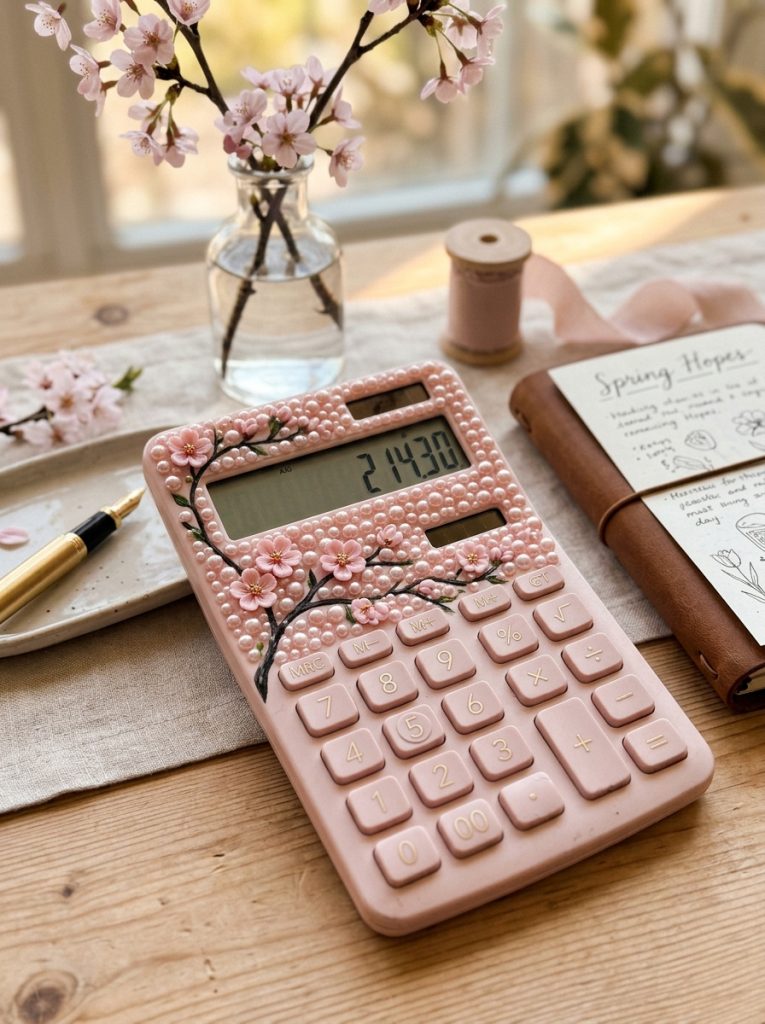
Romantic Cherry Blossom Branch with Blush Pearl Accent Fill
Execution Process
Simulating a flowering cherry blossom branch across your calculator requires placing dark brown resin branch pieces or painted lines topped with tiny pink blossoms. Draft a subtle, diagonal branch outline across the upper casing using a fine-point permanent marker as a placement guide. Glue thin, twig-shaped resin pieces or dark brown flatback rhinestones along the line, creating realistic structural forks. Attach two-millimeter light pink resin cherry blossom cabochons along the branch nodes, ensuring some blossoms overlap the line for natural depth. Fill the remaining negative space surrounding the display with soft blush-pink flatback pearls arranged in dense clusters. This delicate botanical composition provides an artistic, nature-inspired focal point while keeping the keypads fully visible and easy to operate.